
LoveGoBuy Spreadsheet: Find, Compare and Keep the Right Product Links
A LoveGoBuy spreadsheet is most useful when it tells you what to do next with each find. Start with a product category, open the exact listing on LoveGoBuy, and keep the colour, size and unanswered question beside the link. This lets you compare clothing, shoes and accessories without confusing a saved idea with a checked purchase.
What is LoveGoBuy?
LoveGoBuy is a shopping-agent service for purchases from Chinese marketplaces. Its described process moves from a product order to arrival at a warehouse in China, item inspection and an onward international shipment. The marketplace listing, agent service and parcel carrier are different parts of that process; choosing a product does not settle its complete delivery cost.
Why use this guide?
This site puts product discovery and practical explanations together. Shopping entries open LoveGoBuy, while the guides help you check sizes, understand QC photos and separate product prices from parcel estimates. You can follow a specific product link without treating every saved find as a purchase, then read the topic relevant to your next decision.
Our role here is to help you find and compare. Account actions, order confirmation and payment happen in the buying flow you select, not in an article or a shared spreadsheet.
How the shopping process fits together
- Find: search LoveGoBuy or browse a category for the product you want.
- Compare: open the item, confirm the size or option and resolve important questions.
- Order: review the chosen product, quantity and charges in the purchase flow.
- Inspect: compare the received-item information and available photos with the order.
- Ship: choose a parcel service using the actual destination, contents and packing inputs.
For the detailed checks at each stage, open the step-by-step shopping guide. The six guides below let you go straight to a particular question without rereading the full introduction.
Start with the question you have today
| Your question | Where to go | What to leave with |
|---|---|---|
| Which list is worth using? | Best LoveGoBuy spreadsheet | A checklist for comparing lists |
| Does this link identify my item? | Spreadsheet links | The destination and selected option |
| What happens after choosing? | Spreadsheet guide | Separate product, warehouse and parcel steps |
| What can a review actually prove? | Spreadsheet review | A conclusion tied to the stage reviewed |
| Is it safe to use or share? | Safety checks | Checks for links, files and personal information |
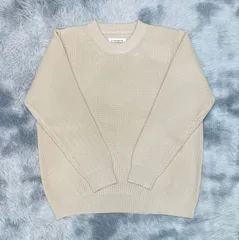
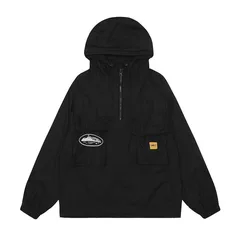
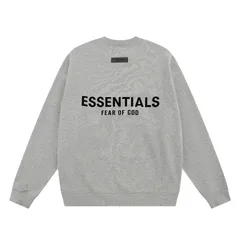
For a product-first approach, browse tops on LoveGoBuy, or use the shoe guide and jacket guide to decide which measurements to compare. Product-category buttons take you to LoveGoBuy; the articles explain the checks to make around that search.
For a starting shortlist, the LoveGoBuy finds guide compares three tops through their different fit and design questions. Use the examples to decide what your own row needs to record.
Give each product a useful row
Keep the exact product URL, short name, category, option, measurement question and next action. Add a dated price observation only after opening the listing. Keep delivery estimates in a separate part of the sheet, because an item price is not a delivered price.
For example, open this charcoal polo listing on LoveGoBuy. A useful note would be “compare chest width and body length with a polo I already wear.” A less useful note would be “looks good.” The listing title identifies the candidate; it does not establish that the size fits you or that every claim in its name has been tested.
Use the same method beyond polos. For shoes, preserve the specific model and size option. For a bag, decide which dimensions matter for what you carry. For a set, check whether each part has its own size information. The point is to make different product questions visible, not to force every category into a single clothing template.
Sort by next action, not by excitement
Three simple labels are enough: compare, ask, and decide. A product with missing measurements belongs under ask. Two adequately described options belong under compare. Only move an item to decide once you have resolved the issue that could change your choice.
Remove a candidate when it no longer meets your need. Saving more links will not answer a sizing question. Before paying, revisit the actual option, quantity and amount rather than relying on the row you created earlier.
Keep QC and shipping attached to the right stage
Seller pictures help identify a listing. QC images can help examine the visible condition of a particular item, provided the item and option match. Neither tells you the complete cost of sending your parcel. Use the QC photo guide for image checks and the shipping guide for the inputs needed to compare parcel estimates.
When sharing a shortlist, leave out account details, addresses, order labels and payment information. Keep any private order record separately from a list intended for other people.
Choose your reading language
Continue in French, Dutch for Belgium, Polish, Spanish, or Arabic for Saudi Arabia. A language version helps explain the workflow; it does not by itself confirm a shipping route to that country.
Quick answers
Is a spreadsheet a shopping cart?
No. It is a way to organise candidates. Check the purchase details in the actual buying flow before confirming an order.
Should I download a file to use the guides?
You can read the guides and follow the product links without downloading a spreadsheet. If you maintain your own sheet, keep it simple and avoid files that request unnecessary permissions.
Where do I find all the topics?
Open the article directory for product, shipping, payment and country guides. Start with the six main guides above if you are new to the process.